My Office: Websites and Domains
Complete guide to domains and web management in My Office by Inmovilla
The My Office by Inmovilla module offers real estate agencies a centralized platform to consult and manage all domains, emails, and websites linked to the contracted services. Additionally, it provides key resources to integrate external web pages with Inmovilla's property catalog, as well as advanced tools to configure which properties are displayed on each web portal.
The Domains and Web tabs are mainly informational, although from the Web section you can also access the editor, download specific integration files, and set custom filters for property publication.
Access and navigation to locate each service
To access these features, go to the user menu located at the top right corner of the application. The navigation steps are as follows:
Click on your avatar, photo, or user icon.
Select the My Office option from the dropdown menu.
Access the Domains tab to consult all information related to domains and associated emails.
Enter the Web tab to review active websites, manage accesses, and explore available resources for connection.
The information shown in these tabs corresponds exclusively to the services that the agency has contracted with Inmovilla.
Detailed information about domains and websites
Although closely related, domain management and web administration are carried out in separate tabs. The Domains section focuses on domain tracking and management, while the Web tab offers a comprehensive overview of linked websites and associated tools.
Domain status and linked emails
When Inmovilla registers a domain or manages its transfer, the Domains tab allows monitoring the progress of this process, facilitating verification of whether the transfer is pending or has been successfully completed.
This section also details information related to emails associated with the domain, providing clear and distinct access to manage these services without confusing them with the status or content of the website.
Management of active and inactive websites and access to the editor
The Web tab collects all websites related to the agency, allowing identification and management of:
Active and inactive websites, enabling clear control over online presence.
Direct access to the web editor, available for real-time modifications and updates.
Domain associated with each website, differentiating between temporary and permanent domains for better management.
XML resources and other technical files necessary for efficient integration and connection between the website and the Inmovilla system.
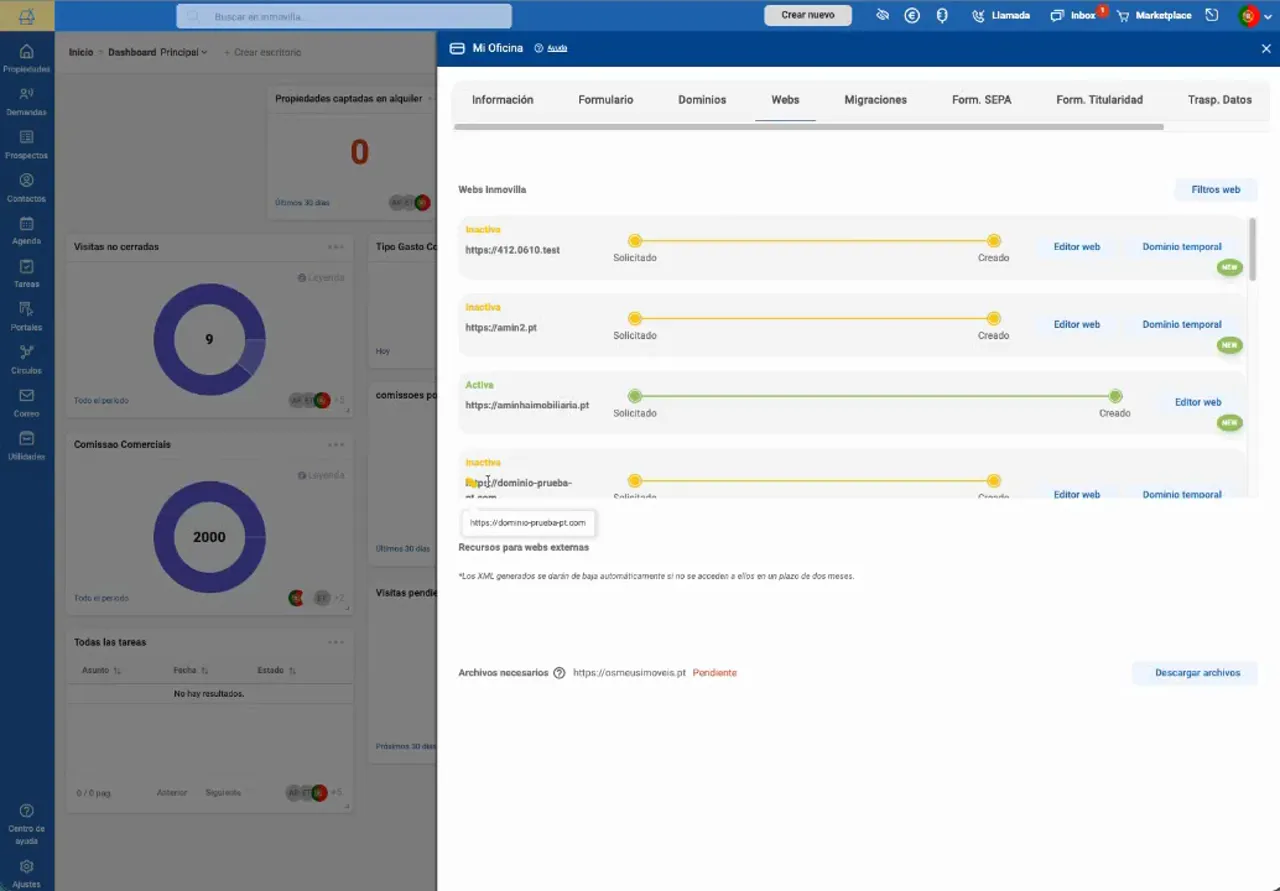
This query clearly distinguishes two fundamental aspects: the operational status of the website and the type of domain used, both reflected in the detailed service information.
Advanced configuration: selection of properties to display on the website
The available filtering options allow precise customization of which properties are shown on each website. You can choose to display exclusively own properties or also include properties from MLS, as well as apply specific criteria such as property type and price range.
To configure this selection, follow these steps:
Select the domain on which you want to configure the property offer, especially if the agency manages multiple domains.
Define the origin of the properties, choosing between showing only own properties or also integrating those from MLS.
Select the property type to limit the types you want to appear on the website.
Adjust the price range to filter the offer according to the economic criteria that suit your commercial strategy.
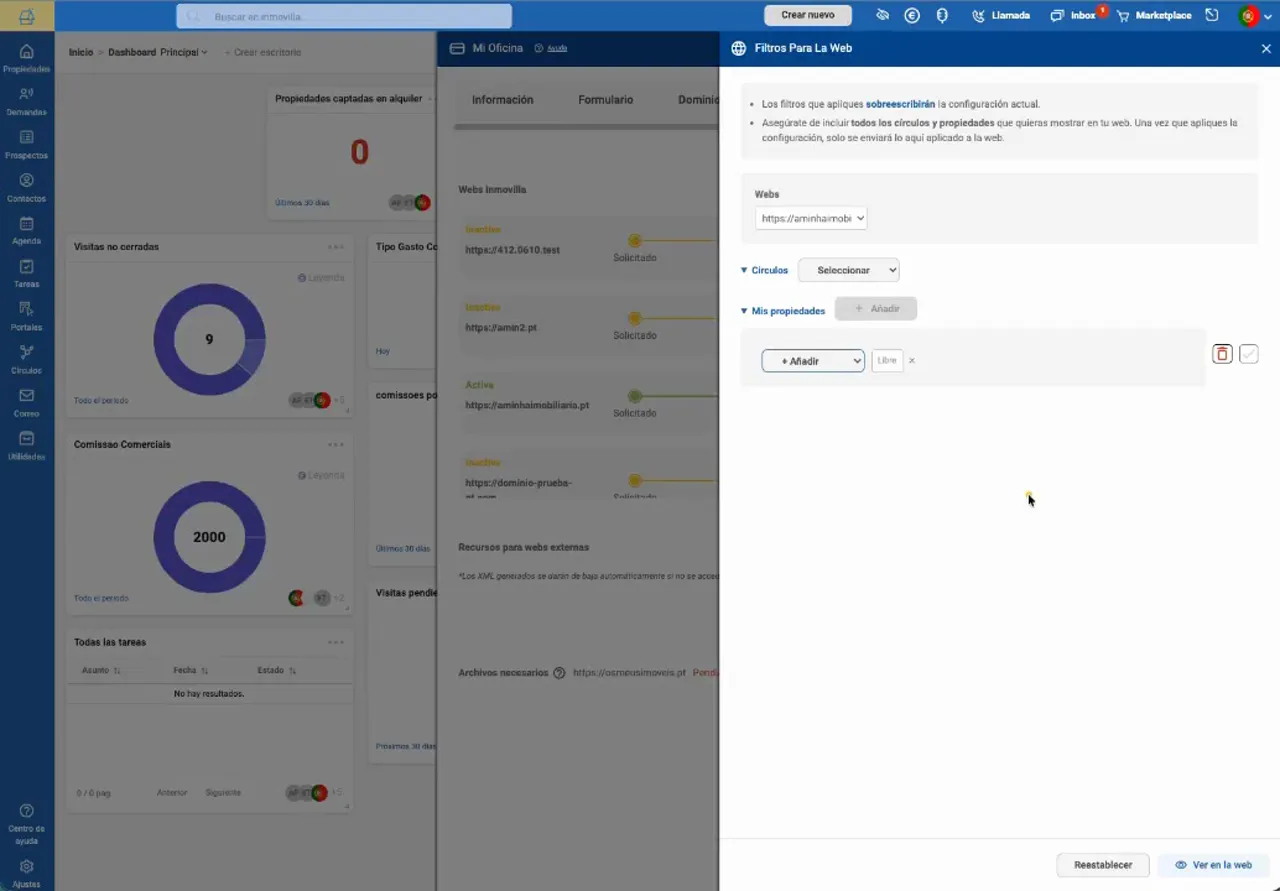
For example, if you want a domain to show exclusively the agency's own portfolio, select that option in the origin filter. If necessary, complement this selection with additional criteria of type and price to refine the visible offer. The correct selection of the domain is essential to effectively apply filtering on the corresponding website.
Integration of external websites with Inmovilla's property catalog
If the agency uses an external website not directly provided by Inmovilla, specific files are available at the bottom of the Web tab to connect that page with the properties managed in Inmovilla's CRM.
These resources are essential to ensure that property listings are correctly sent to clients and that the display of associated content is optimal. The download includes detailed instructions for the correct incorporation of these files into the external website.
The process to perform this integration is as follows:
Locate the connection files at the bottom of the Web tab.
Download the resources along with the technical documentation.
Deliver these materials to the technical person responsible for the website in the agency.
Request that the files be incorporated into the root of the site via FTP, carefully following the provided instructions.
It is important to highlight that the download represents only part of the process: correct integration requires that the files be added to the external website according to the technical guidelines, so it is recommended to provide the technical team with both the files and the complete documentation.
Summary: which section to use according to your needs
To verify the status of a domain transfer or consult associated emails: access the Domains tab.
To review active and inactive websites and access the editor: use the Web tab.
To define which properties are shown on each website: use the filters available in the Web tab, first selecting the corresponding domain.
To integrate an external website with Inmovilla's catalog: download the files from the Web tab and deliver them to the agency's technical person.
Thanks to this organized structure, My Office by Inmovilla not only allows efficient consultation of contracted services but also facilitates access to essential tools to manage and enhance the online presence of the agency's properties.
Perguntas frequentes
Isto foi útil?