Migrations
Migrations in Inmovilla: how to consult and manage your data from My Office
The Migrations tab in My Office offers a centralized tool to consult and monitor all processes related to the incorporation and transfer of data associated with your agency within Inmovilla. This space groups migrations from other real estate programs, transfers between agencies, contact imports, and daily property imports, thus facilitating detailed and up-to-date control of the managed information.
How to access the Migrations tab
To access this functionality, go to the user menu located in the top right corner of the Inmovilla platform. Follow these steps:
Click on your avatar or user photo. This will display the menu associated with your personal account.
Select My Office. From this panel, you will have access to the different tabs and available functionalities.
Click on Migrations. In this section, you will find the different sections corresponding to the various data management processes.
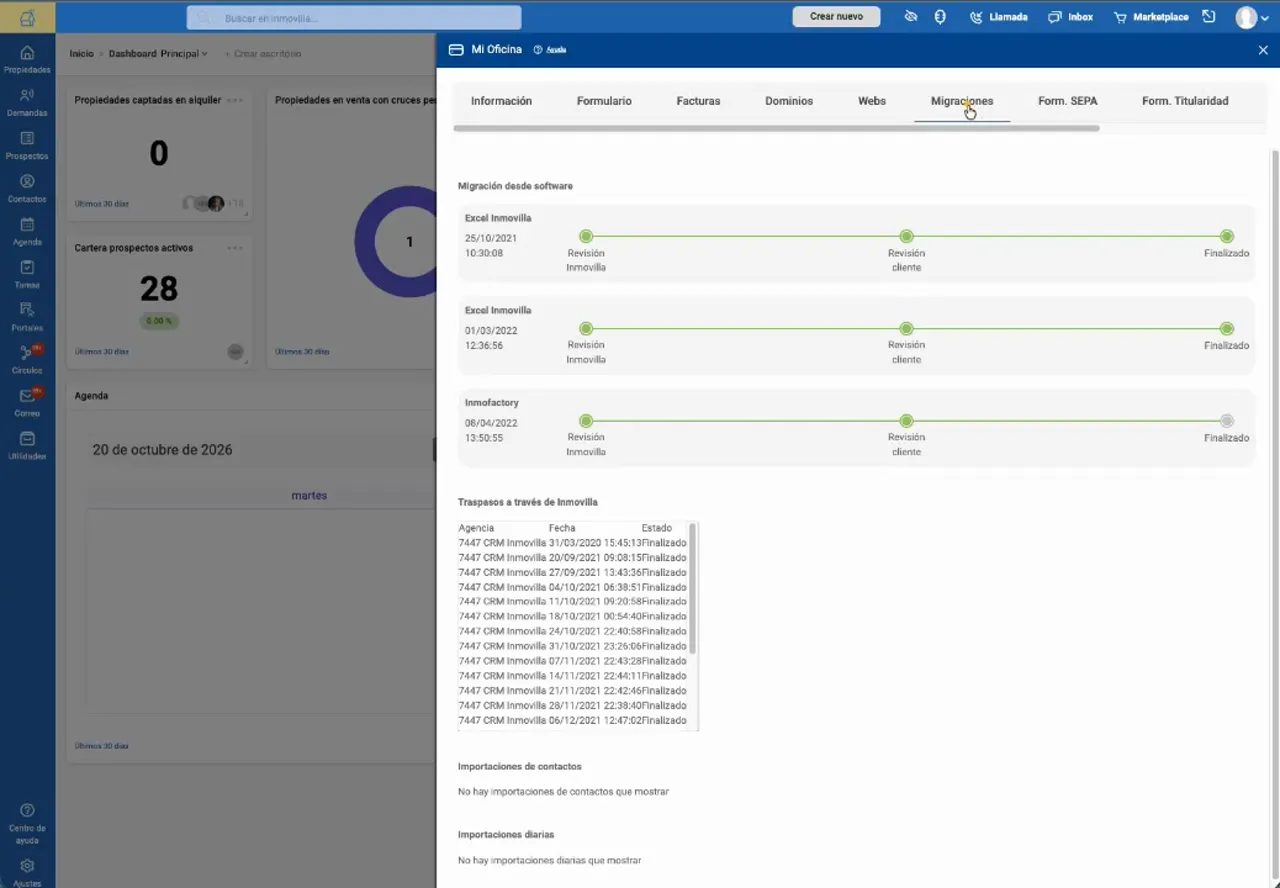
This tool not only allows consulting the initial data dump performed when starting to work with Inmovilla, but also facilitates tracking all movements and data updates that have been made over time.
What is a data migration in Inmovilla?
A migration or data dump refers to the process by which data that an agency previously managed in another system is transferred to Inmovilla. This process is common when starting activity on the platform, when incorporating data from other real estate software or databases, such as Excel spreadsheets.
For example, if an agency managed its real estate portfolio in another program and decides to start using Inmovilla, the initial transfer of that information constitutes a migration. The Migrations tab allows consulting the status and history of this incorporation process.
It is important to differentiate this initial migration from daily imports: while migration implies a one-time transfer from a source system, daily imports refer to the periodic and continuous updating of data.
Which section to consult according to the type of process?
Although all these movements are grouped in the Migrations tab, each block is designed to cover specific needs. To locate the appropriate information, it is essential first to identify the type of operation performed.
Software migrations: data from external systems
This section shows migrations carried out from other real estate programs. An agency may have several migrations registered if it has incorporated data at different times or from different systems throughout its time in Inmovilla.
The listed programs will depend on the specific migrations associated with the agency. Inmovilla has direct migration processes for various source systems, although not all agencies will have the same records.
Daily imports: periodic property updates
Daily imports allow properties to be incorporated and updated automatically and periodically, usually from XML files that the agency sends to the technical support team.
The usual process is as follows:
The agency provides the XML file to support. This file contains the updated information to be imported.
The support team configures and prepares the daily import. This step requires support intervention to adapt the process to the specific needs of the agency.
The data is incorporated and updated automatically every day. The tracking and consultation of these processes is done from the Migrations tab.
Contact imports: specific management of contact records
Inmovilla has a dedicated tool for importing contacts. When imports are made using this functionality, the records are reflected in the corresponding section within Migrations.
To consult contact incorporations, it is advisable to look in this specific block, as the information and processes differ from software migrations.
Transfers: data transfer between agencies
Transfers refer to the transfer of data between different agencies, situations that may arise due to internal reorganizations, changes in office structure, or the separation of a user who begins to work independently.
The operational management of transfers is carried out from the Transfers tab within the same panel. From Migrations, it is possible to check if recent transfers have been made. In cases of users becoming independent, the process requires the explicit authorization of the originating agency to ensure the correct transfer of data.
A clear path to consult each type of process
For effective tracking of your data, access user avatar > My Office > Migrations and locate the block corresponding to the type of operation: software migrations, daily imports, contact imports, or transfers.
This organization allows you to precisely consult the required process, avoiding confusion between the initial data dump, periodic updates, or movements between agencies, thus ensuring transparent and efficient management of your agency's information.
Perguntas frequentes
Isto foi útil?