RGPD
As definições de RGPD no Inmovilla permitem definir, de forma muito concreta, quem pode receber comunicações da agência por email, WhatsApp e newsletter. É aqui que controlamos os consentimentos dos contactos e evitamos que uma comunicação automática seja enviada para alguém sem a validação adequada.
Estas configurações exigem atenção. A ferramenta permite escolher comportamentos mais abrangentes, mas a responsabilidade pelo cumprimento do Regulamento Geral sobre a Proteção de Dados continua a ser da agência.
Onde encontrar as definições de RGPD
Aceda a Definições, entre em Opções e selecione o segundo separador, RGPD. Para alterar qualquer regra, clique em Editar, no canto superior direito.
Nesta área existem definições para três canais principais:
Envio de emails
Envio de mensagens por WhatsApp
Envio de newsletters
Além disso, encontram-se opções que determinam quando um contacto passa automaticamente a ter um estado de validação associado à agência, ao portal ou ao escritório.
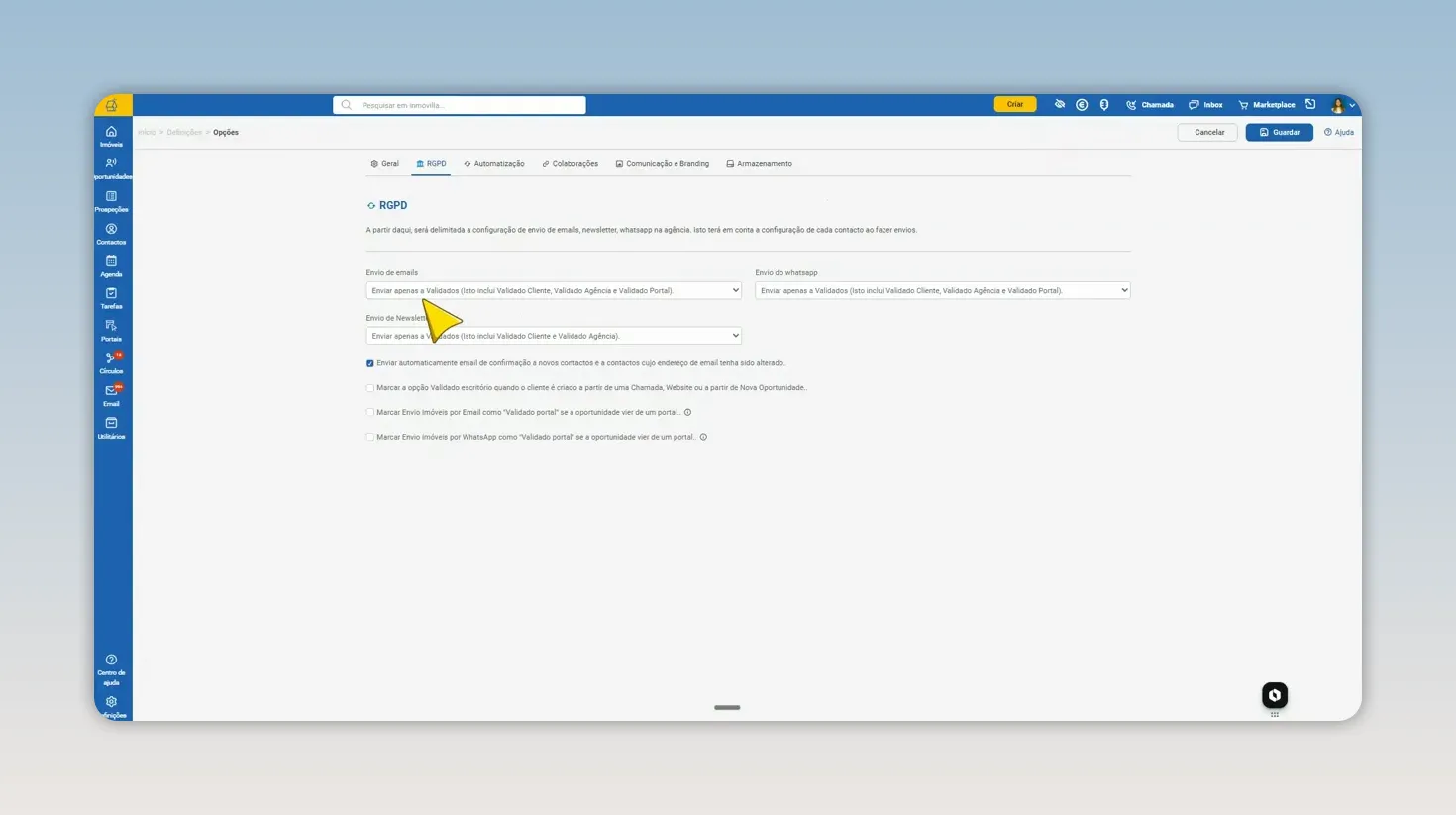
As regras de consentimento são configuradas por canal, para que a agência controle cada tipo de comunicação.
Definir quem recebe emails
Na opção Envio de emails, existem duas possibilidades.
Enviar apenas a contactos validados
Esta é a configuração predefinida. Com esta opção ativa, os emails enviados pela ferramenta só seguem para contactos que tenham um estado de consentimento validado.
O contacto pode estar validado de diferentes formas:
Validado pelo cliente, quando o próprio contacto confirma a aceitação.
Validado pela agência, a agência registou o consentimento por outros meios (por exemplo, verbalmente ou assinado).
Validado pelo portal, quando a origem e as regras configuradas permitem esse estado.
Na prática, esta é a escolha mais restritiva: não permite o envio para contactos que ainda estejam pendentes de aceitar as comunicações.
Enviar a contactos validados e pendentes
A segunda opção permite enviar emails tanto a contactos validados como a contactos pendentes de validação do RGPD.
É uma configuração que amplia a audiência das comunicações, mas deve ser usada com muita cautela. Um contacto pendente não deu necessariamente consentimento explícito para receber comunicações da agência.
Configurar o envio por WhatsApp
O WhatsApp segue exatamente a mesma lógica dos emails. Pode escolher entre:
Enviar apenas a contactos validados.
Enviar a contactos validados e pendentes.
É importante tratar estes canais de forma independente. Um contacto pode estar elegível para receber imóveis por email e não estar elegível para receber comunicações por WhatsApp, consoante as regras e os estados de consentimento definidos.
Controlar o envio de newsletters
Na área de newsletters, existem três comportamentos possíveis:
Enviar apenas a validados, incluindo contactos validados pelo cliente e pela agência.
Utilizar a mesma configuração do envio de emails, para manter os dois canais alinhados.
Não enviar nada, caso não pretenda utilizar newsletters.
Se selecionar a opção para utilizar a mesma configuração dos emails, a newsletter passa a respeitar exatamente a regra definida para esse canal. Isto simplifica a gestão quando pretende manter uma política única de consentimento para comunicações por email.
O aviso legal ao enviar para contactos pendentes
Sempre que alterar uma regra para enviar comunicações a contactos validados e pendentes, surge uma nota legal no sistema.
O aviso deixa claro que essa escolha pode resultar em comunicações dirigidas a contactos sem consentimento explícito, algo que pode estar em incumprimento com o RGPD. Ao continuar, a agência assume integralmente a responsabilidade por eventuais consequências, incluindo sanções resultantes desse incumprimento.
O Inmovilla disponibiliza a configuração, mas não assume responsabilidade pela utilização indevida da informação ou pelas decisões da agência relativas ao consentimento dos contactos.
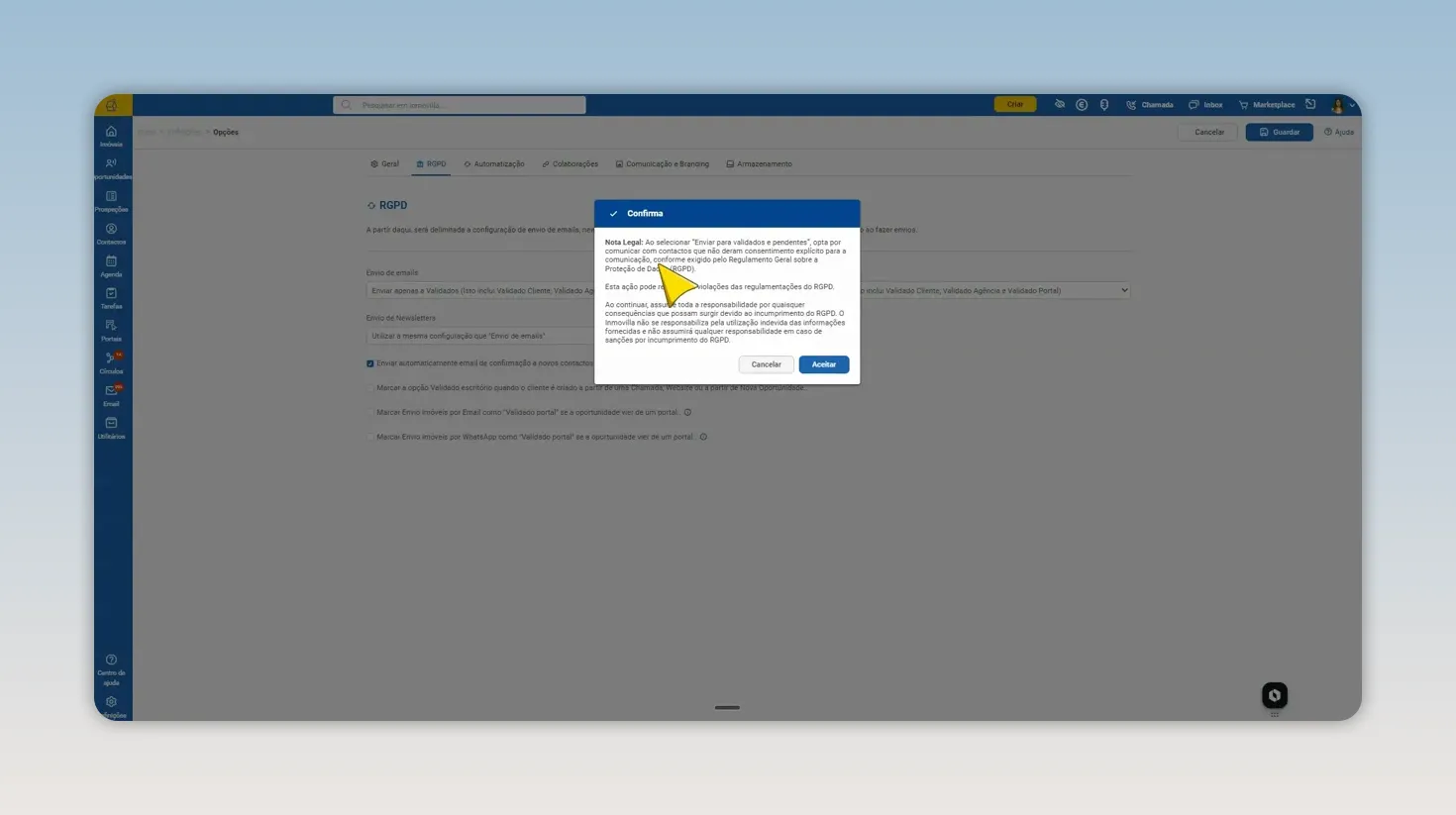
Antes de permitir comunicações a contactos pendentes, o sistema reforça que a responsabilidade de conformidade é da agência.
Enviar automaticamente o email de confirmação de RGPD
Existe uma opção que vem ativa por defeito: enviar automaticamente um email de confirmação a novos contactos e a contactos cujo endereço de email tenha sido alterado.
Esta opção aplica-se apenas a contactos introduzidos manualmente no Inmovilla. Se o contacto for criado automaticamente a partir de um email, de um portal ou do website, esse email de confirmação não é enviado.
Se não pretender este envio automático para contactos inseridos manualmente, pode desmarcar a opção. Caso contrário, sempre que criar um novo contacto ou substituir o email de um contacto existente, será enviada uma mensagem para o novo endereço.
Onde editar o modelo de email
O conteúdo da mensagem está disponível em Definições, Modelos automáticos. Procure o modelo RGPD Email.
Este é o modelo usado para comunicar a confirmação de receção de futuros emails. O assunto e o corpo do email podem ser personalizados, incluindo texto e elementos visuais da agência.
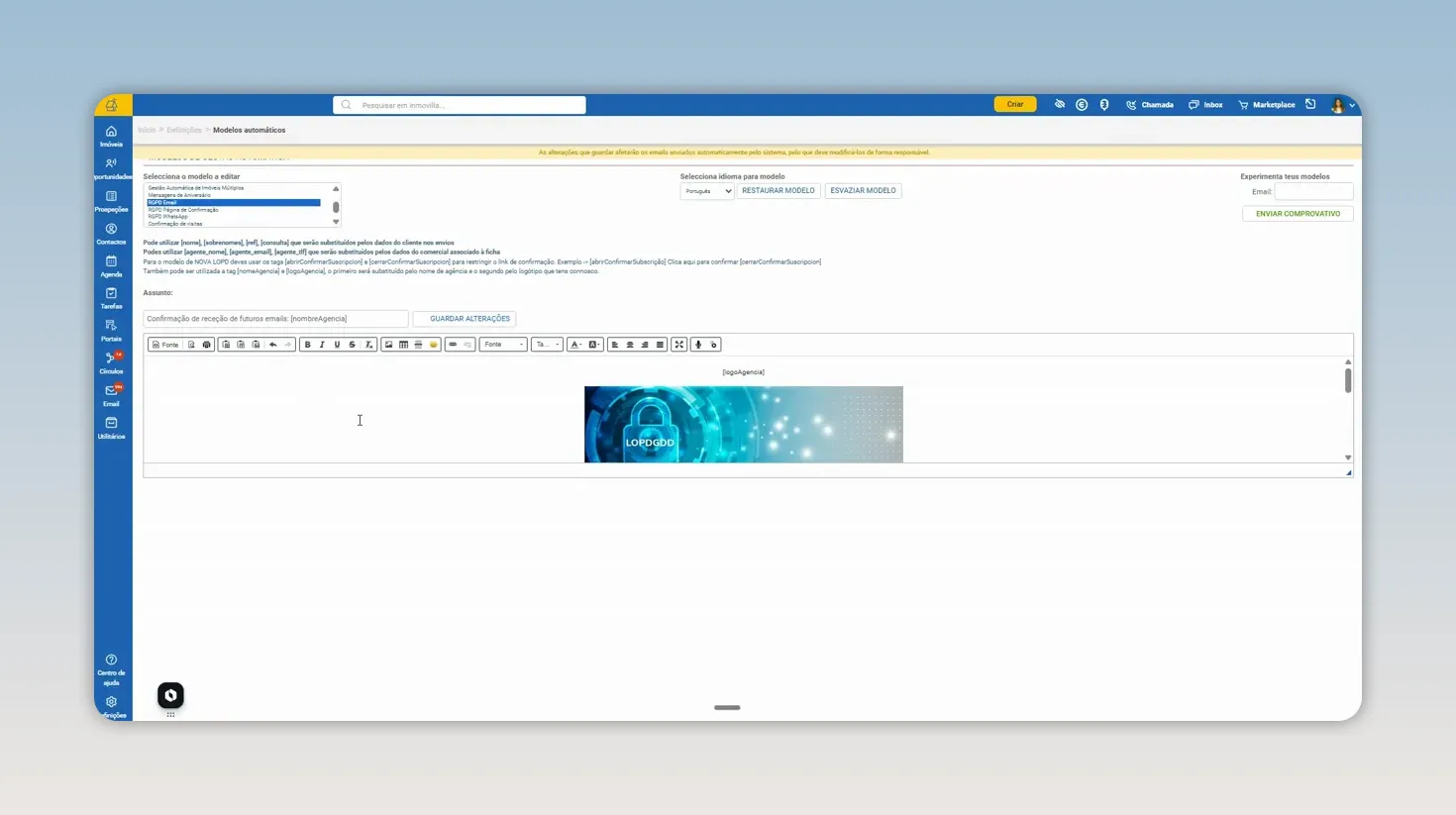
O modelo RGPD pode ser adaptado à comunicação da agência, mantendo os elementos técnicos essenciais.
O que é atualizado automaticamente no email
O modelo utiliza informações da configuração da agência. O nome apresentado é obtido da área Minha Agência, e o logótipo também corresponde ao logótipo aí configurado.
É possível alterar o assunto, o texto e até remover o logótipo, se fizer sentido para a identidade da agência. No entanto, há elementos que não devem ser modificados.
Não altere os parâmetros de confirmação
No modelo existem parâmetros técnicos responsáveis por registar se o contacto aceitou ou recusou a subscrição. Estes parâmetros são indispensáveis para que o Inmovilla consiga identificar a decisão tomada.
Por isso, nunca deve editar ou remover o parâmetro de confirmação. Se o fizer, o sistema deixa de conseguir saber se o cliente aceitou a comunicação e o email deixa de cumprir a sua função de validação RGPD.
O mesmo princípio aplica-se aos elementos dinâmicos entre parênteses usados para apresentar dados como o nome da agência. Pode optar por ocultar um elemento visual, como o logótipo, mas não deve alterar os parâmetros técnicos associados.
Validação automática quando um contacto é criado
Depois das regras de envio, existem opções que definem automaticamente o estado RGPD em determinadas origens de contacto.
Contactos criados por chamada, website ou nova oportunidade
A opção marcar validade escritório quando o cliente é criado a partir de uma chamada, do website ou de nova oportunidade aplica-se a três situações:
Criação de contacto através do botão de chamada.
Criação de contacto através de uma nova oportunidade.
Entrada de contacto pelo website, criando uma oportunidade ou contacto automaticamente.
Quando esta opção está ativa, esses contactos ficam marcados como validados pelo escritório. Como resultado, passam a poder receber emails segundo as regras de comunicação para contactos validados.
Antes de ativar esta regra, confirme que o processo da agência para captar contactos nestes canais está alinhado com a base legal e os procedimentos internos de proteção de dados.
Contactos originados em portais imobiliários
As oportunidades provenientes de portais, como um pedido de interesse feito no Idealista, podem ser criadas automaticamente no Inmovilla a partir do email recebido.
Há duas opções distintas para estas situações:
Validar envio de imóveis por email
A opção marcar envio de imóveis por email como validado por portal se a oportunidade vier de um portal faz com que o contacto fique automaticamente como validado pelo portal para o envio de imóveis por email.
Com a opção ativa, a agência pode enviar automaticamente imóveis por email a esse contacto.
Validar envio de imóveis por WhatsApp
Existe uma opção equivalente para o WhatsApp: marcar envio de imóveis por WhatsApp como validado por portal se a oportunidade vier de um portal.
Embora o contacto tenha a mesma origem, email e WhatsApp são configurações separadas. Ativar a validação para email não ativa automaticamente a validação para WhatsApp, e vice-versa.
Guardar e aplicar as alterações
Depois de selecionar as opções pretendidas, clique sempre em Guardar. Sem esse passo, as alterações não ficam registadas.
Para que as novas definições fiquem visíveis e sejam aplicadas corretamente, saia do Inmovilla e entre novamente.
Checklist final para uma configuração RGPD consciente
Defina separadamente as regras de email, WhatsApp e newsletters.
Prefira o envio apenas para contactos validados, sempre que esse for o enquadramento aplicável.
Leia atentamente o aviso legal antes de incluir contactos pendentes nas comunicações.
Mantenha ativos e inalterados os parâmetros técnicos do modelo de email RGPD.
Confirme as regras de validação automática para contactos criados por chamadas, website, oportunidades e portais.
Guarde as alterações e volte a entrar no sistema para as aplicar.
Uma configuração bem feita ajuda a equipa a comunicar com consistência, automatizar processos e, acima de tudo, tratar o consentimento dos contactos com o cuidado que ele exige.
Perguntas frequentes
Isto foi útil?